
Test Automation Platform
AI • Test Automation • DevTools • Enterprise UX
A full-stack automation platform that enables both technical and non-technical users to create, enhance, and execute stable Playwright tests using natural language or recorded browser scripts. The system uses AI to normalize unstable Salesforce selectors, runs tests on GitLab CI via Docker, and returns full video evidence and HTML reports in a clean, human-readable UI.

My Role — Sole Designer & Product Lead
I owned this project end-to-end as a single-person design and product team, responsible for:
– Defining the problem and automation strategy
– Designing the full system architecture and workflows
– Translating Playwright + CI complexity into usable UX
– Designing AI-assisted script creation and modification flows
– Creating all interaction states, edge cases, and error handling
– Designing the results viewer for logs, videos, and reports
– Aligning AI behavior with automation safety and reliability
There were no additional designers or PMs involved — I led the project independently from concept to internal adoption.
01 — The Problem
UI test automation at Smarteeva was powerful but not scalable.
While Playwright and GitLab CI were already in use, only a small group of engineers could reliably create and maintain tests. Salesforce’s unstable DOM structure made scripts flaky, and debugging failures required deep DevTools knowledge.
❌ What teams struggled with
Test creation required Playwright specialists
Salesforce DOM changes constantly broke selectors
Regression cycles often took hours
QA depended heavily on engineers for fixes
GitLab CI logs were unreadable for non-engineers
Debugging failures required DevTools expertise
No single place to create, enhance, run, and review tests
Resulting business friction
Slow regression cycles
High Dev–QA back-and-forth
Low confidence in automation stability
Increased release risk
Poor visibility into pipeline failures
The opportunity
Create an automation platform that can:
✔ Generate Playwright tests without writing code
✔ Automatically stabilize flaky Salesforce selectors
✔ Run tests reliably on GitLab CI
✔ Provide visual proof (video + HTML) for every run
✔ Make CI results understandable to non-engineers
✔ Scale automation across QA, engineering, and release teams
02 — Users & Needs
Primary Users
QA testers (technical + non-technical)
Automation engineers
Release managers
Engineering teams
Core Needs
“Create a test without writing Playwright.”
“Fix flaky selectors automatically.”
“Run tests without touching CI configs.”
“Show me why a test failed.”
“I need video proof, not logs.”
“Let me modify tests safely without breaking them.”
The platform had to be fast, safe, explainable, and reliable.
03 — Goals
Business Goals
Reduce regression cycle time by 50%+
Decrease test flakiness caused by Salesforce DOM changes
Reduce Dev–QA dependency
Increase confidence in automation coverage
UX Goals
Zero-code test creation
AI assistance without breaking existing scripts
Clear feedback for pipeline execution
Visual evidence for failures
Support both beginners and power users
04 — Architecture Overview (Simplified)
The system was designed as a layered automation pipeline, separating creation, enhancement, execution, and results.
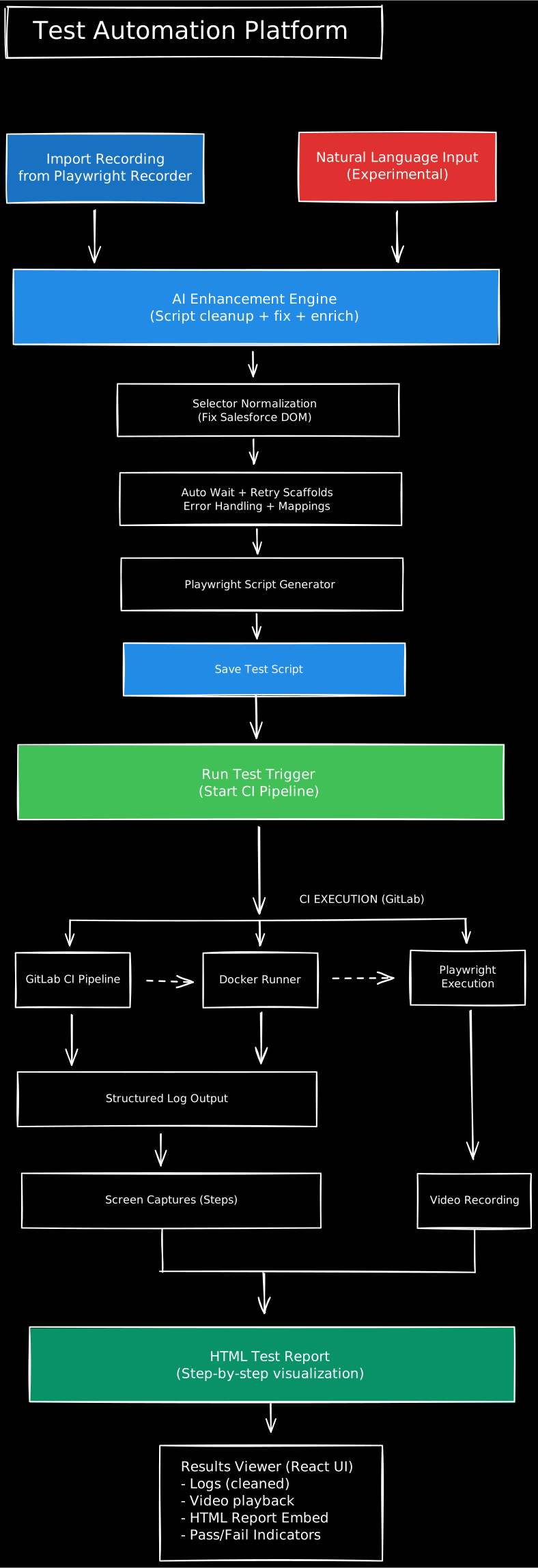
1. Test Creation Inputs
Import Playwright recorder scripts
Natural-language test instructions (experimental)
2. AI Enhancement Engine
Cleans raw scripts
Normalizes unstable Salesforce selectors
Adds auto-waits and retries
Injects error handling and assertions
Preserves original logic safely
3. Script Generation
Produces production-grade Playwright tests
Supports custom selectors and mappings
Saves scripts for reuse and modification
4. GitLab CI Execution
Docker-based Playwright runners
Cross-browser execution
Video recording + screenshots
HTML report generation
5. Results Delivery
Cleaned pipeline logs
Video playback
Embedded HTML reports
Pass / fail indicators with timestamps
05 — UX Strategy
Key UX Priorities
Abstraction without loss of power
Users shouldn’t need to understand Playwright internals to succeed.
Safety over creativity
AI enhances scripts but never deletes or overwrites critical logic.
Evidence-first debugging
Video + step-by-step reports before logs.
Progressive disclosure
Beginners see simple flows. Power users can inspect scripts.
Predictable execution
Clear states: Ready → Running → Completed → Failed.
06 — Key Screens
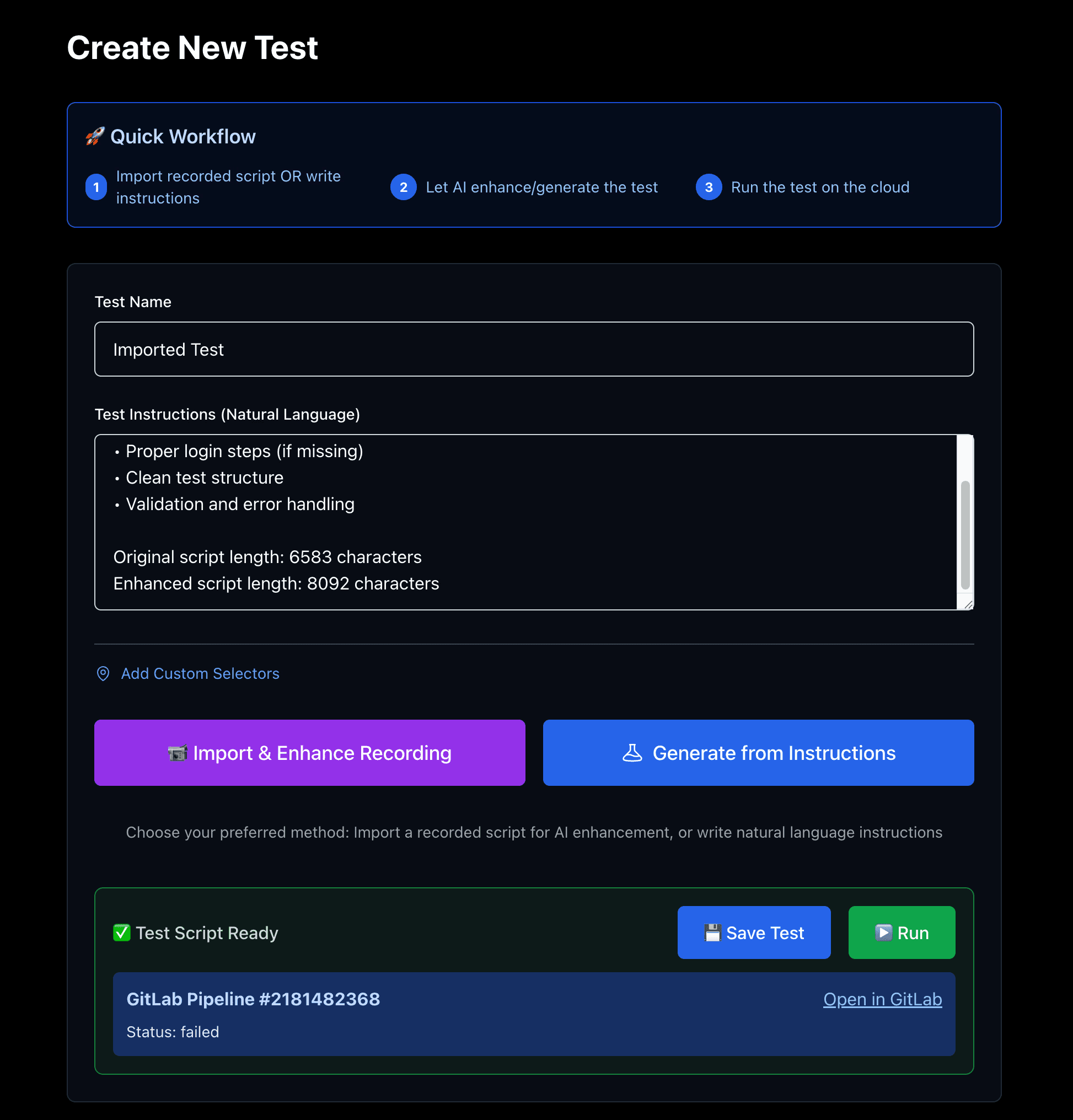
Screen 1 — Create New Test
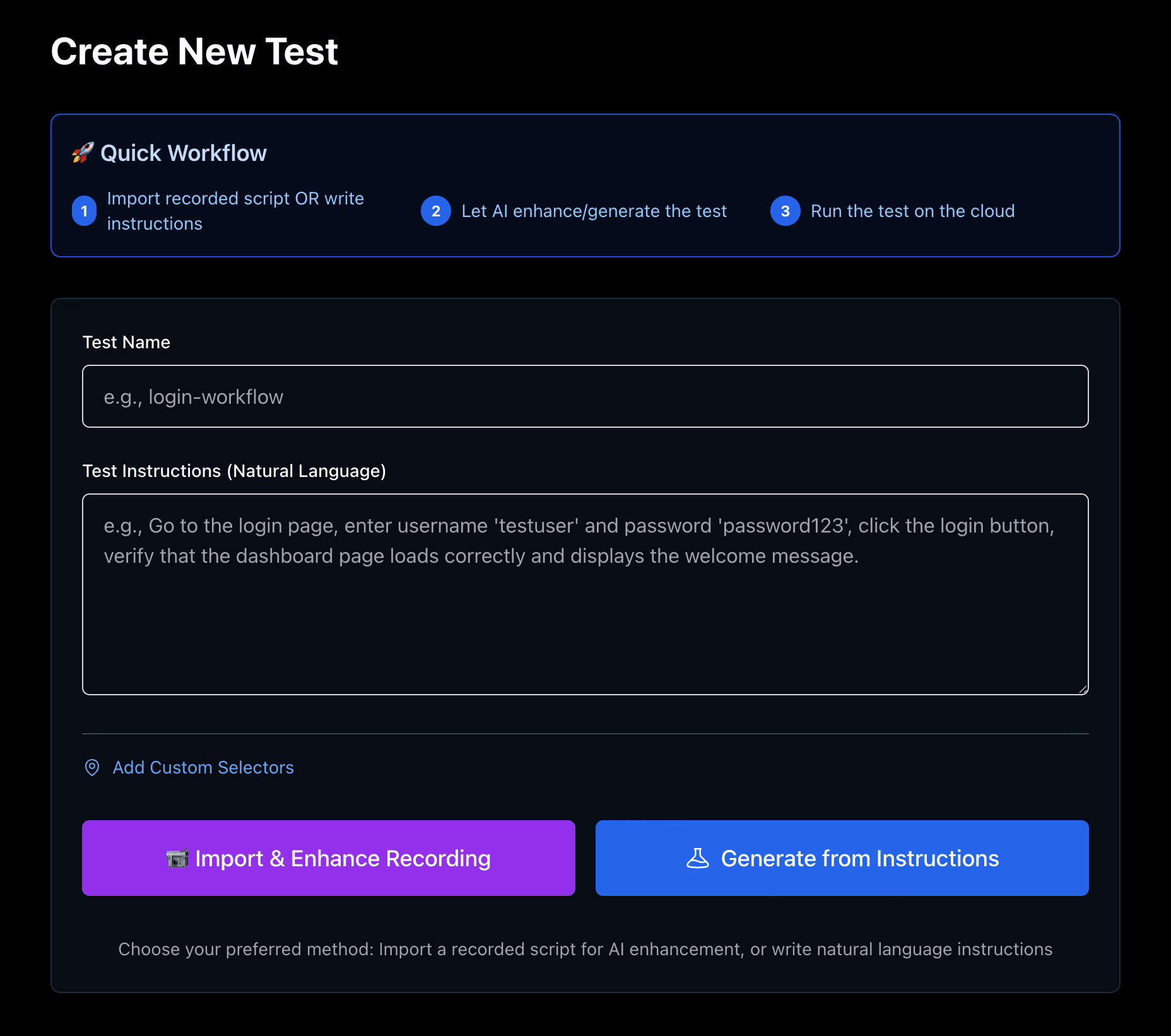
A guided entry point with a clear 3-step workflow:
Import recording or write instructions
Let AI enhance the test
Run on cloud CI
This reduced intimidation for non-technical testers.
Screen 2 — Import & Enhance Recording
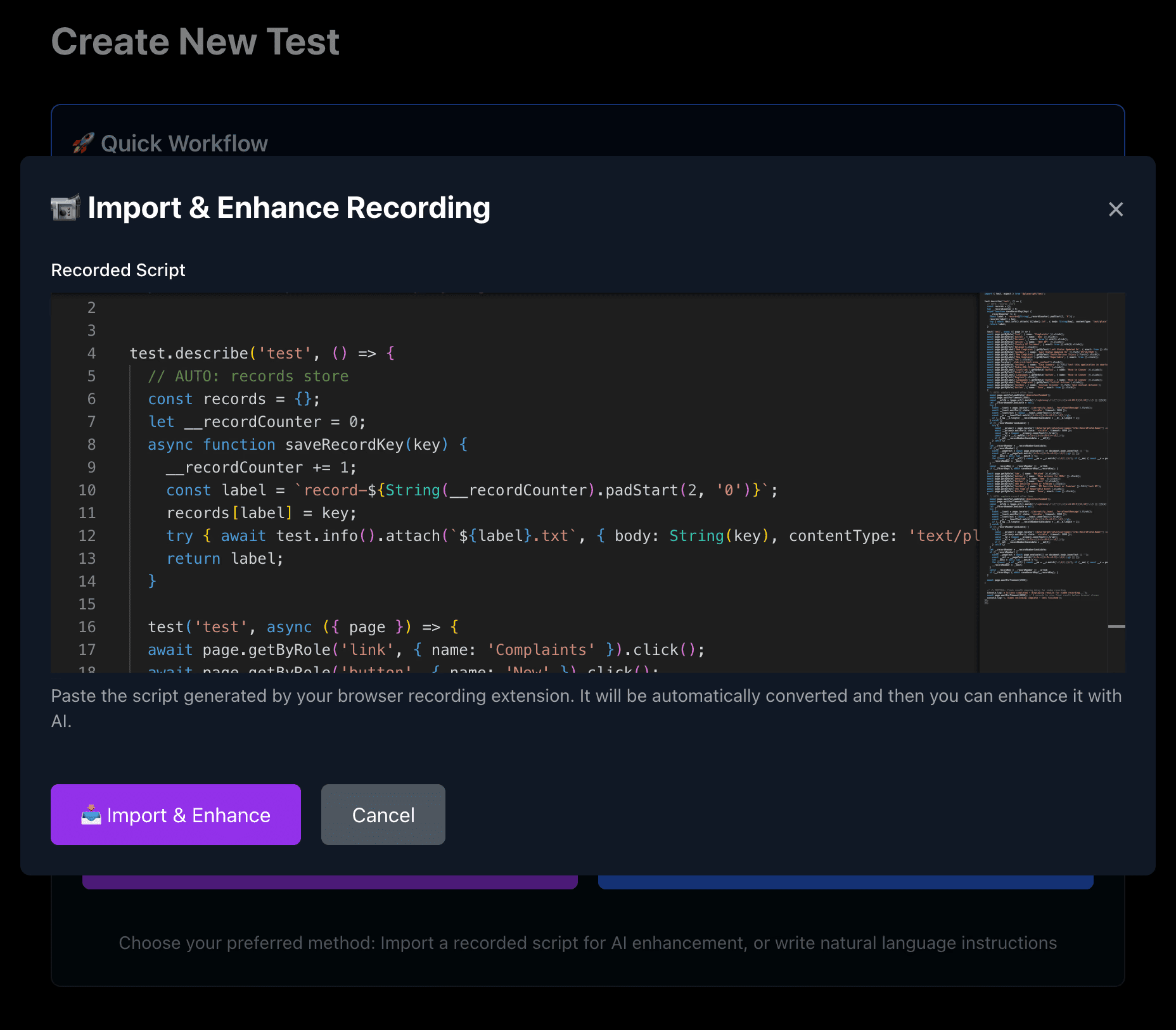
Users paste Playwright recorder output.
AI enhances it by:
Cleaning structure
Normalizing selectors
Adding waits and retries
The original script is always preserved.
Screen 3 — AI-Enhanced Script Viewer
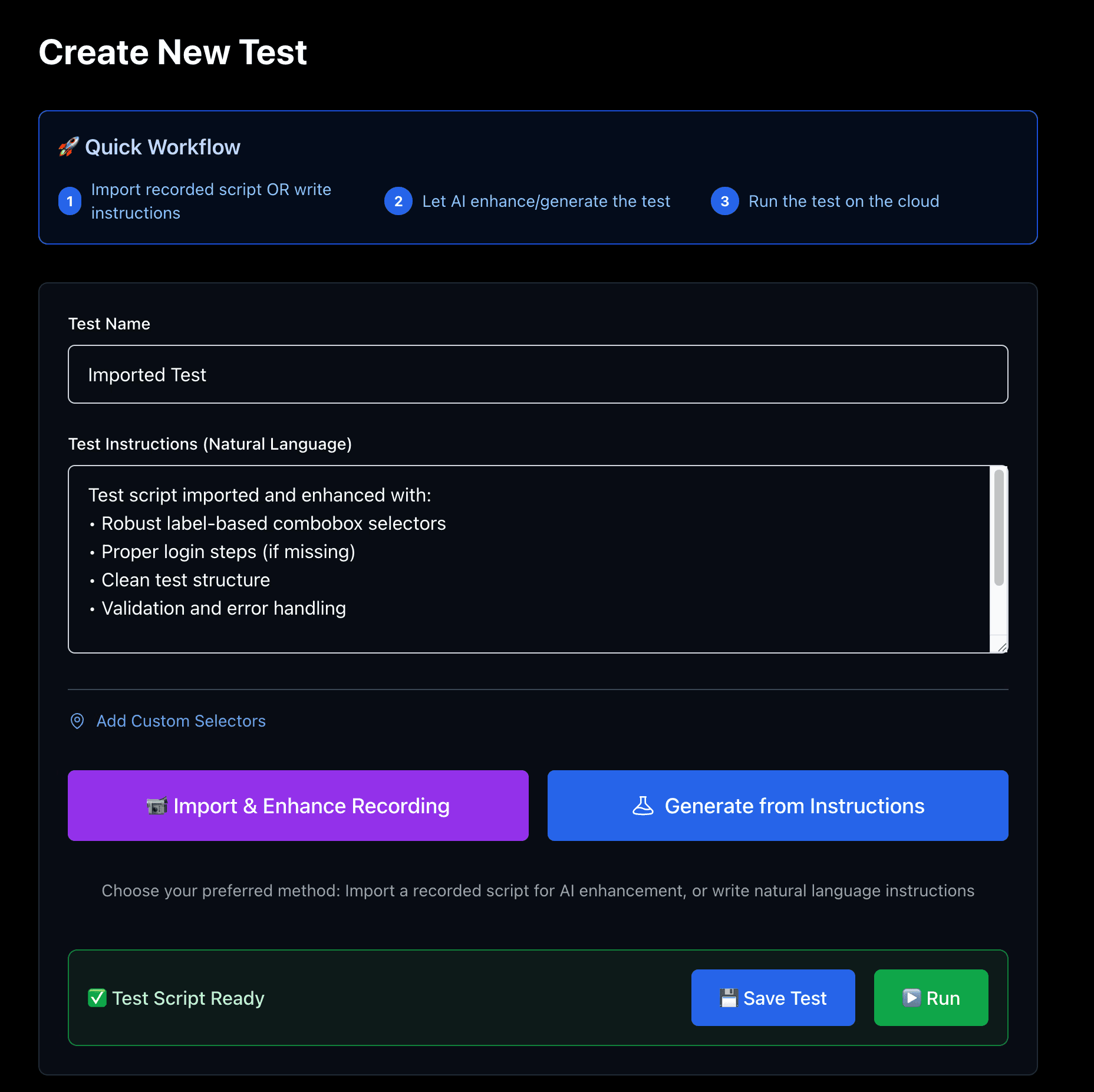
Read-only by default
Copy/export supported
Clear indicators of enhancements applied
This builds trust and transparency.
Screen 4 — AI Script Modification
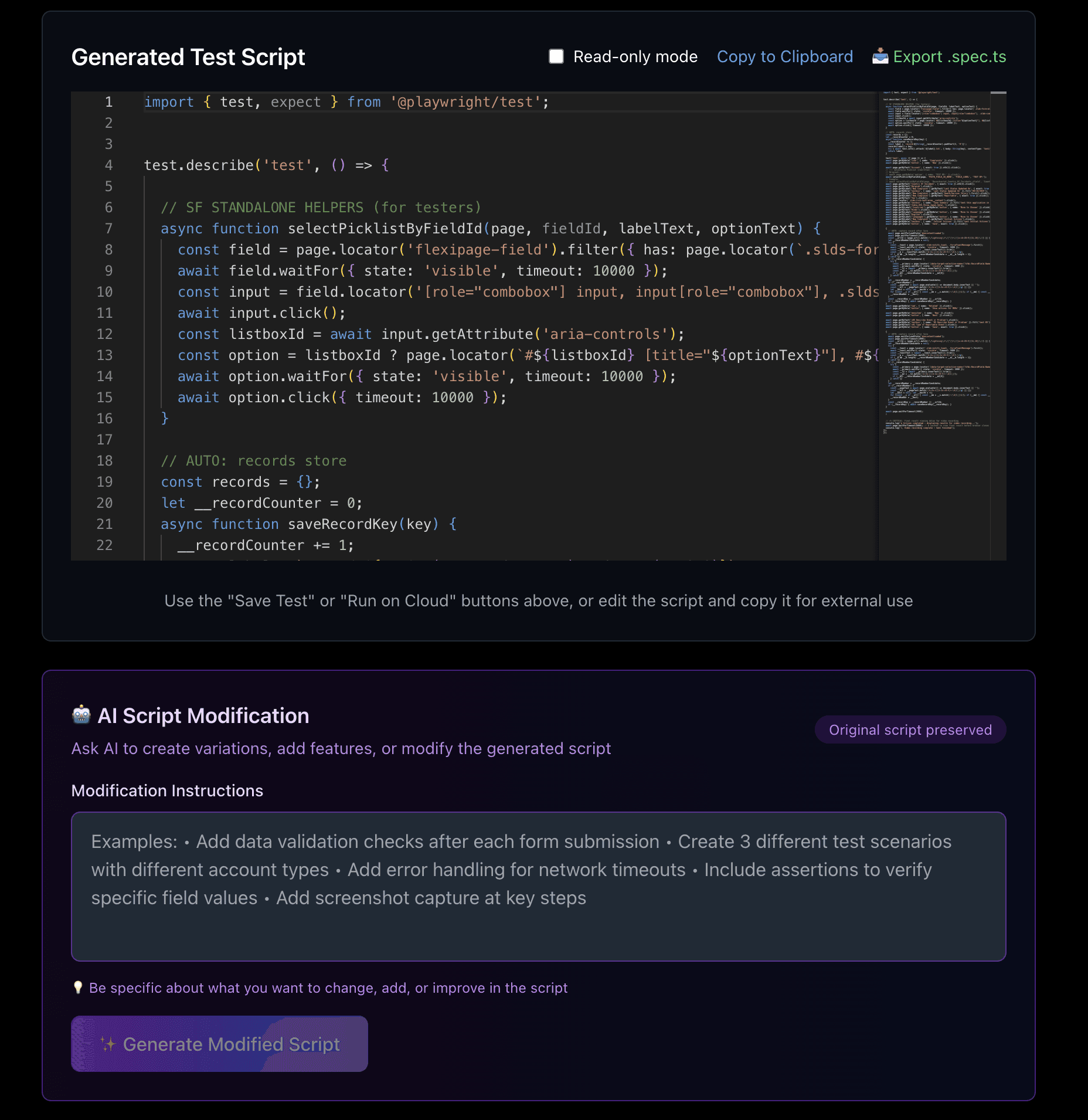
Users can request:
New test variations
Additional validations
Error handling
Screenshot capture
AI modifies scripts safely without destructive changes.
Screen 5 — Test Execution & CI Status
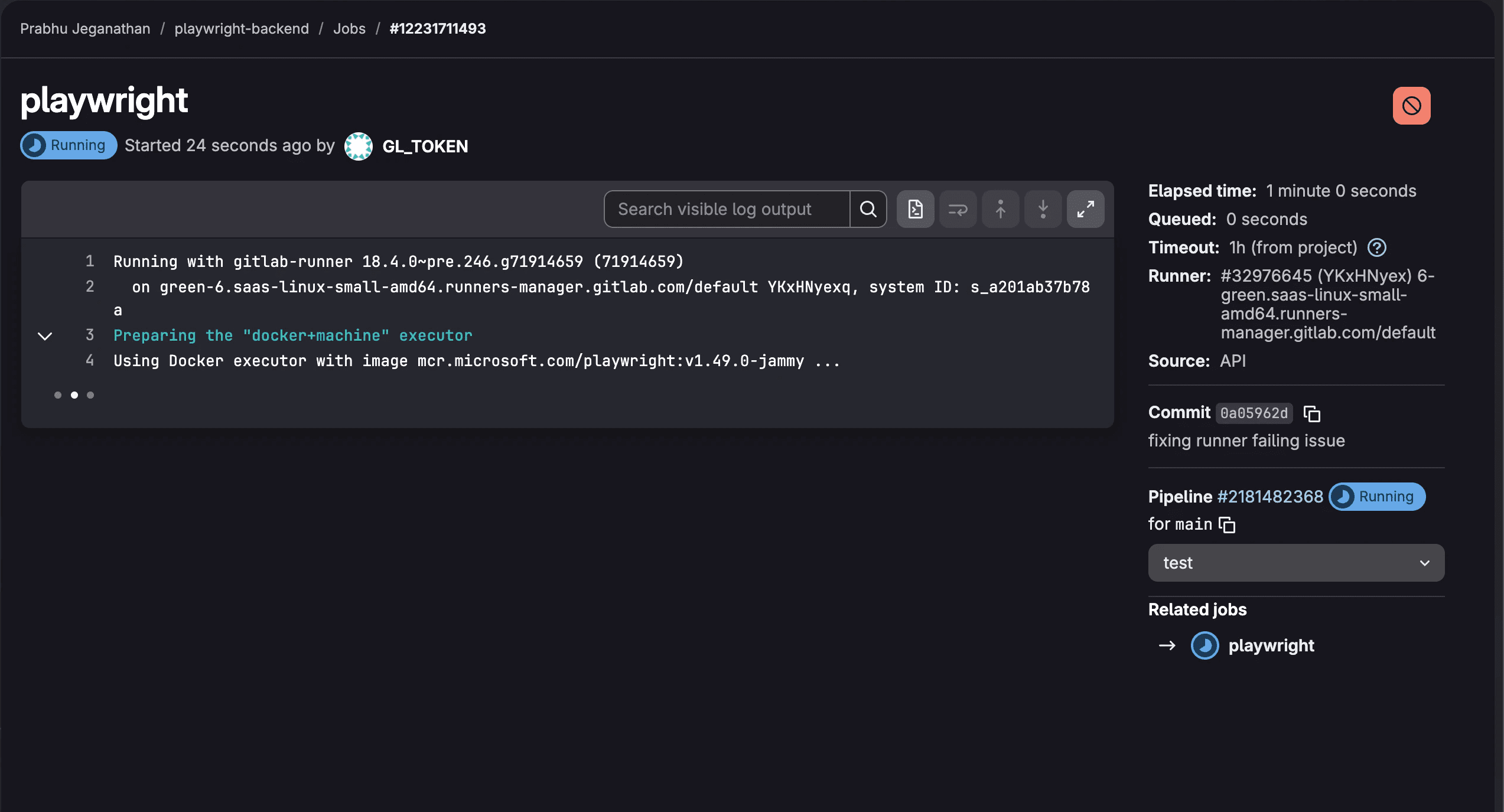
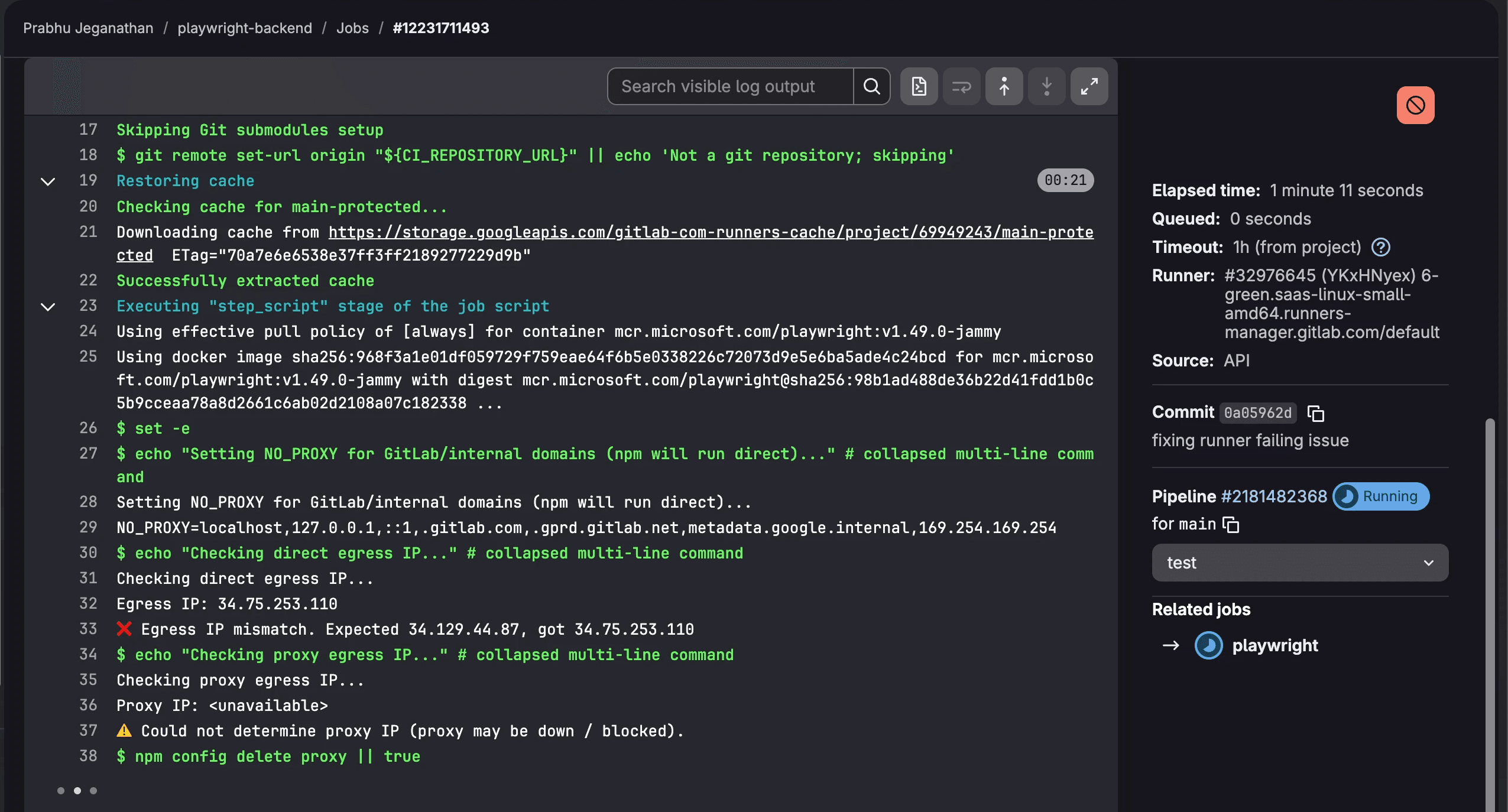
Run tests directly from UI
Live GitLab pipeline status
Clear success/failure indicators
Direct link to pipeline when needed
Screen 6 — Results Viewer
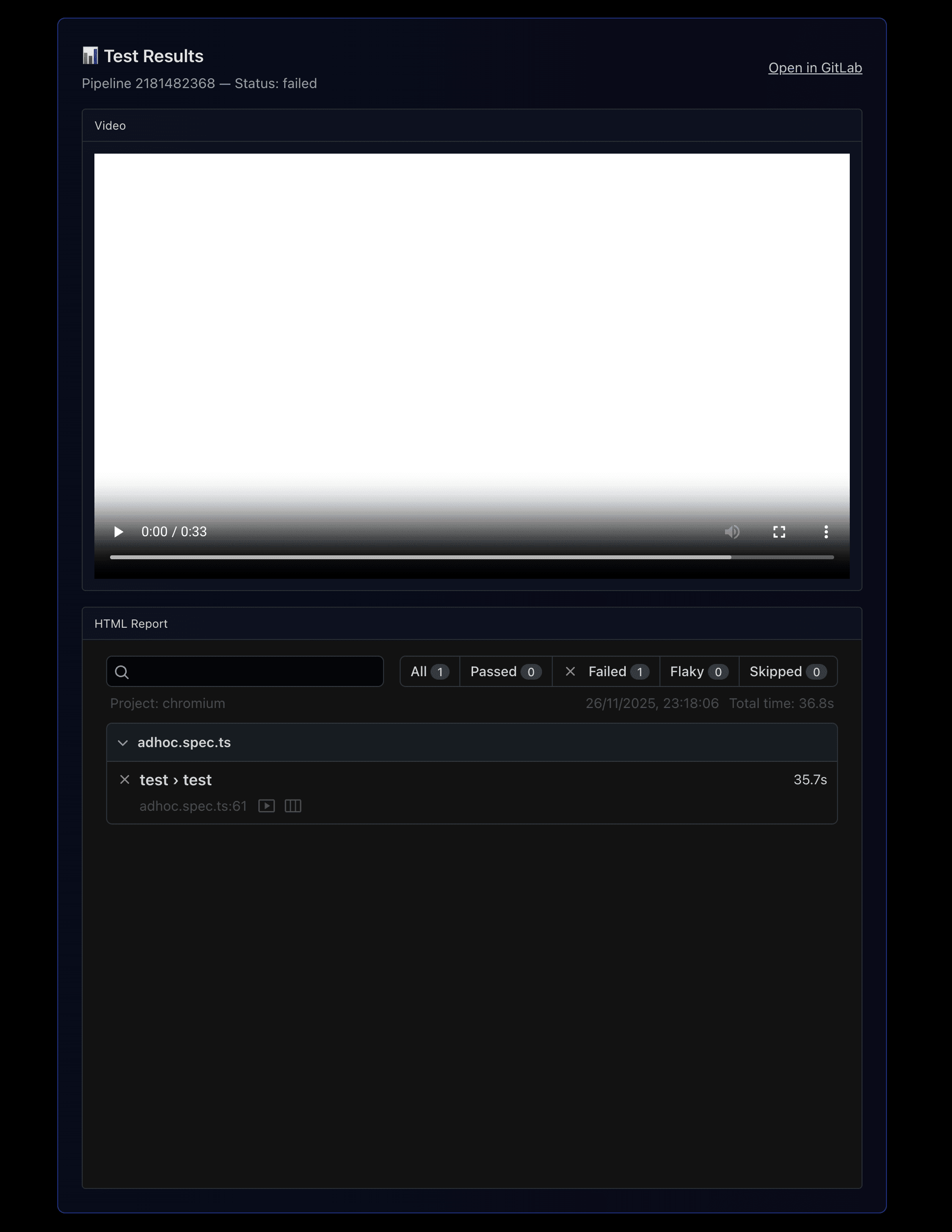
Embedded video playback
Step-by-step HTML report
Cleaned logs
Pass/fail summaries
Non-technical users finally understood CI results.
07 — Design System
1. Design Principles
Reliability > novelty
Clarity over density
Evidence before explanation
2. Color System
Optimized for dark mode and long sessions.
Purple / Blue — actions & AI operations
Green — successful execution
Red — failure states
Neutral dark surfaces — focus & readability
3. Typography
Monospace for scripts
Inter for UI
Clear hierarchy for logs and reports
4. Accessibility
High contrast
Clear status indicators
Large click targets
Minimal motion
08 — Impact
Quantitative
Test creation: 3 hours → ~5 minutes
Regression cycles reduced 50–70%
Script flakiness reduced ~40%
Dev–QA interruptions dropped significantly
Qualitative
Testers felt empowered without writing code
Release managers gained confidence with visual proof
Engineering saw fewer broken pipelines
Faster, calmer release cycles
09 — Challenges & Learnings
Challenges
Normalizing unpredictable Salesforce DOM structures
Making CI logs understandable for non-engineers
Preventing unsafe AI modifications
Designing for both beginners and experts
Handling pipeline failures gracefully
What I Learned
How to abstract DevTools-heavy workflows
How to apply AI safely in automation
How to design for reliability, not just speed
How to create human-readable CI feedback loops
How to build maintainable internal platforms
10 — Flow Chart
The flow below shows how test creation, AI enhancement, CI execution, and results delivery are cleanly separated.
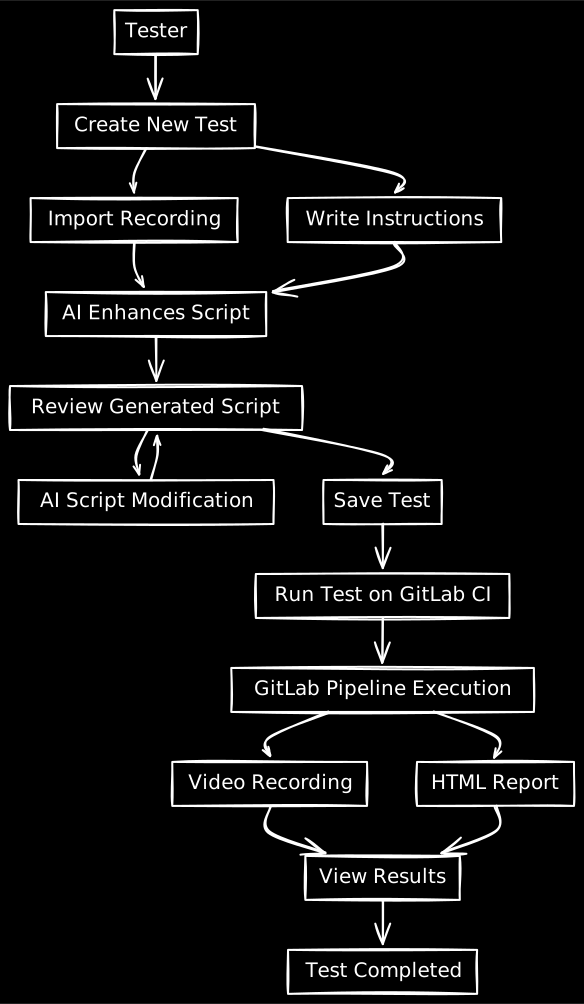
Key principles:
AI enhances scripts but never overwrites originals
CI execution is isolated and reproducible
Results are visual and explainable
12 — Final Reflection
This project deepened my ability to design AI-assisted developer tools for mixed audiences.
I learned how to:
Translate complex engineering systems into usable products
Design automation workflows that scale across teams
Balance AI assistance with safety and trust
Improve reliability in CI-heavy environments
Build internal tools that last, not just launch
The Test Automation Platform became a critical foundation for faster, more reliable releases across the organization.