
Release Notes Manager
AI • Productivity • Enterprise Automation
A unified, AI-powered internal platform that generates, reviews, and publishes release notes automatically from Jira stories across multiple Salesforce-based product packages. Designed to eliminate manual documentation work, enforce consistency, and give non-technical teams full control over release communication.
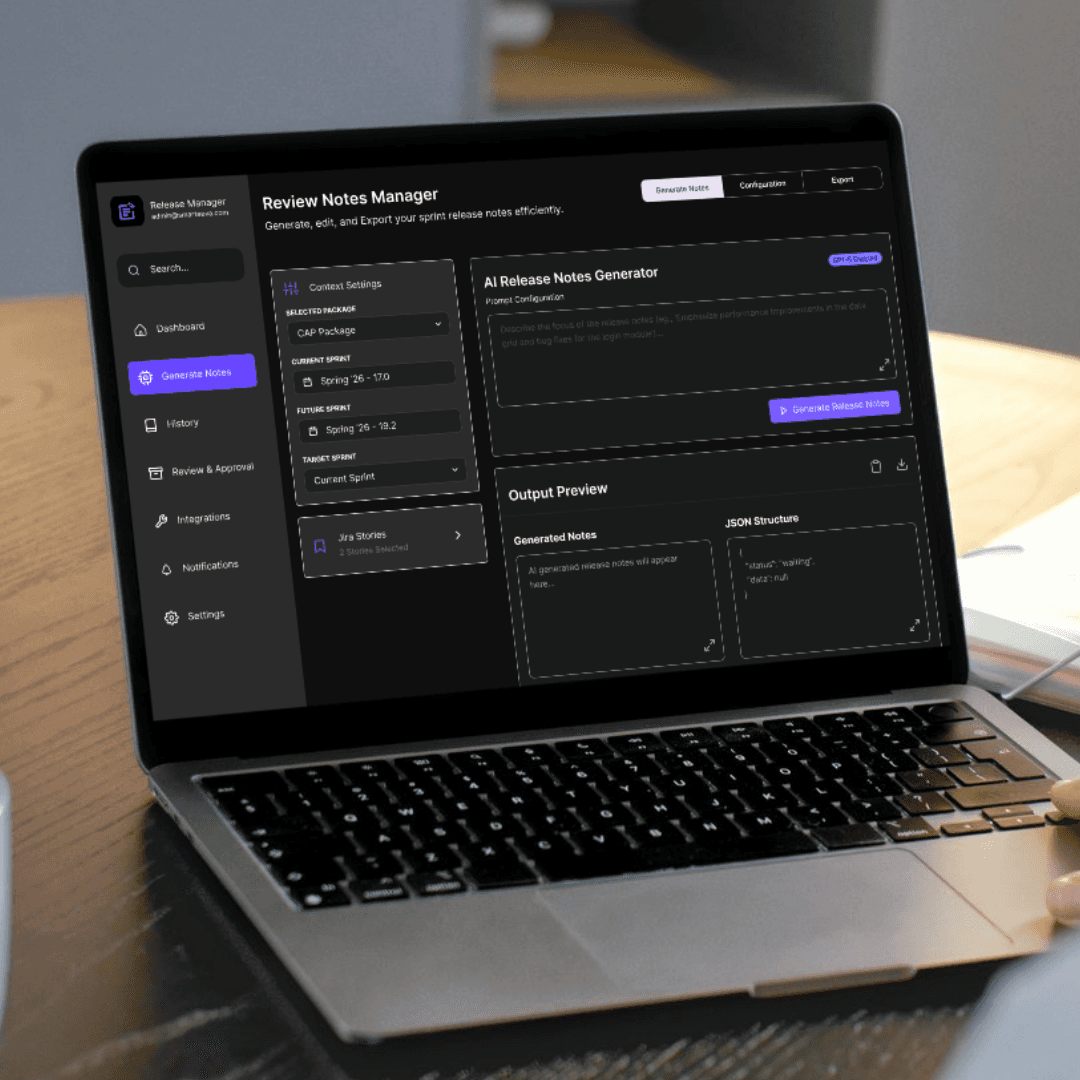
My Role — Sole Designer & Product Lead
I owned this project end-to-end as a single-person design team, responsible for:
– Defining the documentation problem and release workflow gaps
– Designing the full release management information architecture
– Mapping Jira and AI constraints into UX patterns
– Creating all interaction flows and UI states
– Designing the design system for light and dark modes
– Writing UX, AI prompt, and implementation specifications
– Aligning AI output structure with review, approval, and publishing logic
There were no additional designers, product managers, or UX teams involved — I handled the entire project independently from concept to delivery.
01 — The Problem
Release documentation at Smarteeva was fully manual and increasingly unscalable.
Every sprint, release managers and product teams had to compile release notes by hand from Jira, Slack, and commit logs. As product complexity grew across CAP, BASE, and RMP packages, the process became slow, inconsistent, and error-prone.
❌ What users struggled with
Engineers wrote Jira stories inconsistently
Jira descriptions were overly technical and not user-facing
No standard release format across packages
Managers rewrote content every sprint
Information was scattered across multiple tools
PDF exports required copy-paste and manual formatting
Reviews and approvals happened late
Resulting business friction
Hours wasted every release cycle
Inconsistent communication to customers
High dependency on engineering teams
Last-minute rewrites and delays
Poor visibility into release readiness
The Opportunity
Create a release management system that can:
✔ Generate readable release notes automatically from Jira
✔ Enforce consistent structure across all packages
✔ Support multi-sprint and multi-version releases
✔ Allow human review and approval before publishing
✔ Publish directly to documentation
✔ Export branded PDFs without manual effort
02 — Users & Needs
Primary Users
Release Managers
Product Owners
QA Leads
Engineering Managers
Implementation & Support Teams
Core Needs
“Generate release notes without rewriting Jira.”
“Combine multiple packages into a single release.”
“Review and approve AI output safely.”
“Export clean PDFs for stakeholders.”
“Maintain consistency across every release.”
Release Notes Manager needed to be predictable, reviewable, and scalable — not just automated.
03 — Goals
Business Goals
Reduce release documentation effort
Standardize release formats across teams
Reduce reliance on engineering for documentation
Improve release communication quality
UX Goals
Deterministic AI output with no surprises
Clear review and approval workflow
Support complex, multi-package releases
Fast editing, regeneration, and export
Strong governance and trust controls
04 — Architecture Overview (Simplified)
The Release Notes Manager is designed as a two-phase system:
Generation & Publishing, followed by Export & Distribution.
The system intentionally separates AI generation from external sharing to ensure accuracy, governance, and predictable outputs.
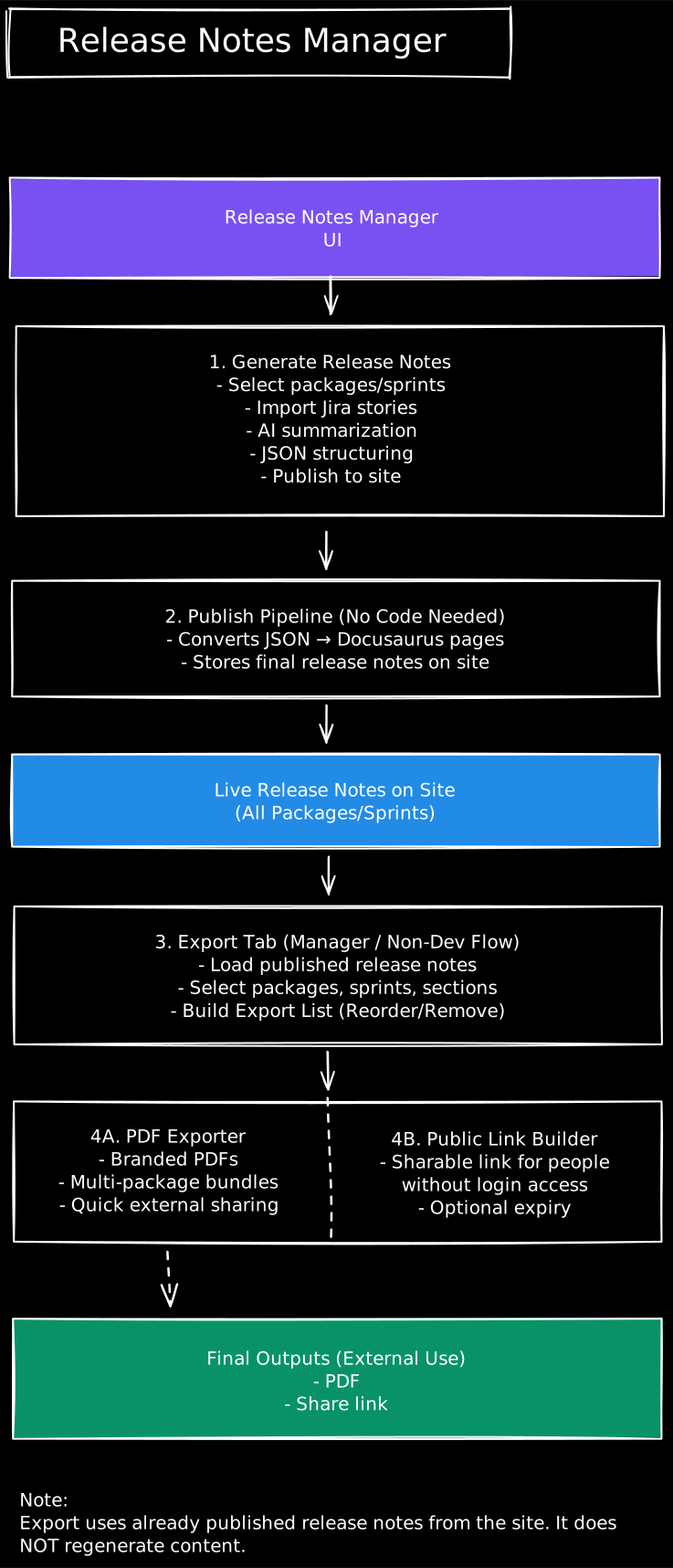
Phase 1 — Generate & Publish
Users select packages and sprints
Jira stories are imported and normalized
AI generates structured release notes
Content is validated and published to the documentation site as the single source of truth
Phase 2 — Export & Share (No Code Required)
Managers load already published release notes
Packages, sprints, and sections are selected
Export lists can be reordered or trimmed
Final outputs are generated as:
Branded PDFs
Public shareable links (optional expiry)
Important:
The export flow never regenerates AI content.
It only consumes already published release notes, ensuring consistency, trust, and auditability.
05 — UX Strategy
Key UX Priorities
Trust over automation
AI never auto-publishes. Review and approval are mandatory.
Predictable structure
Every release follows the same schema across teams.
Enterprise scalability
Designed for large releases spanning multiple packages and versions.
Minimal cognitive load
Clear hierarchy, restrained color usage, and focused layouts.
06 — Key Screens
Screen 1 — Release Dashboard
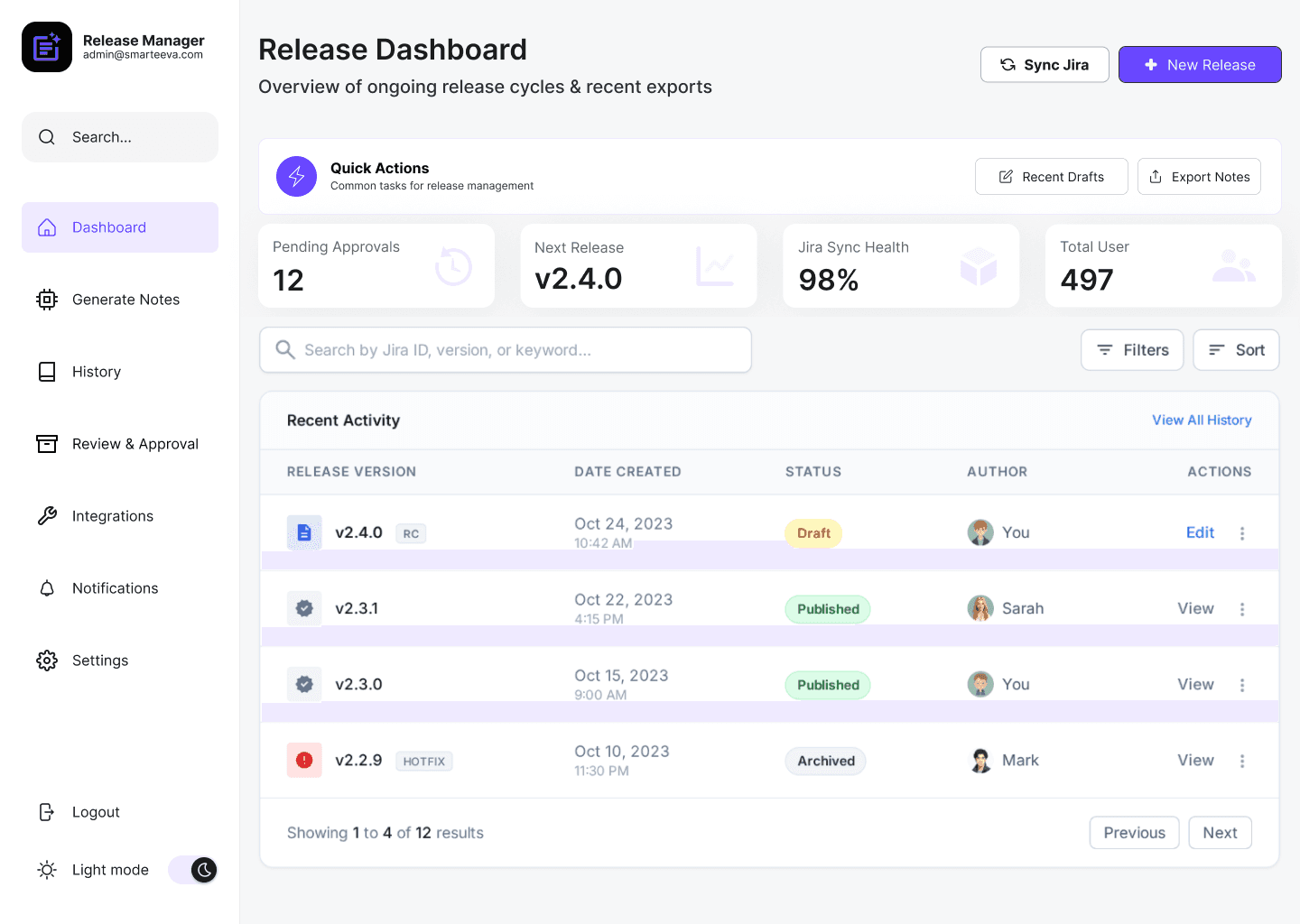
Overview of ongoing and past releases
Approval status and ownership
Jira sync health
Quick access to drafts and exports
Acts as a single source of truth.
Screen 2 — AI Release Notes Generator
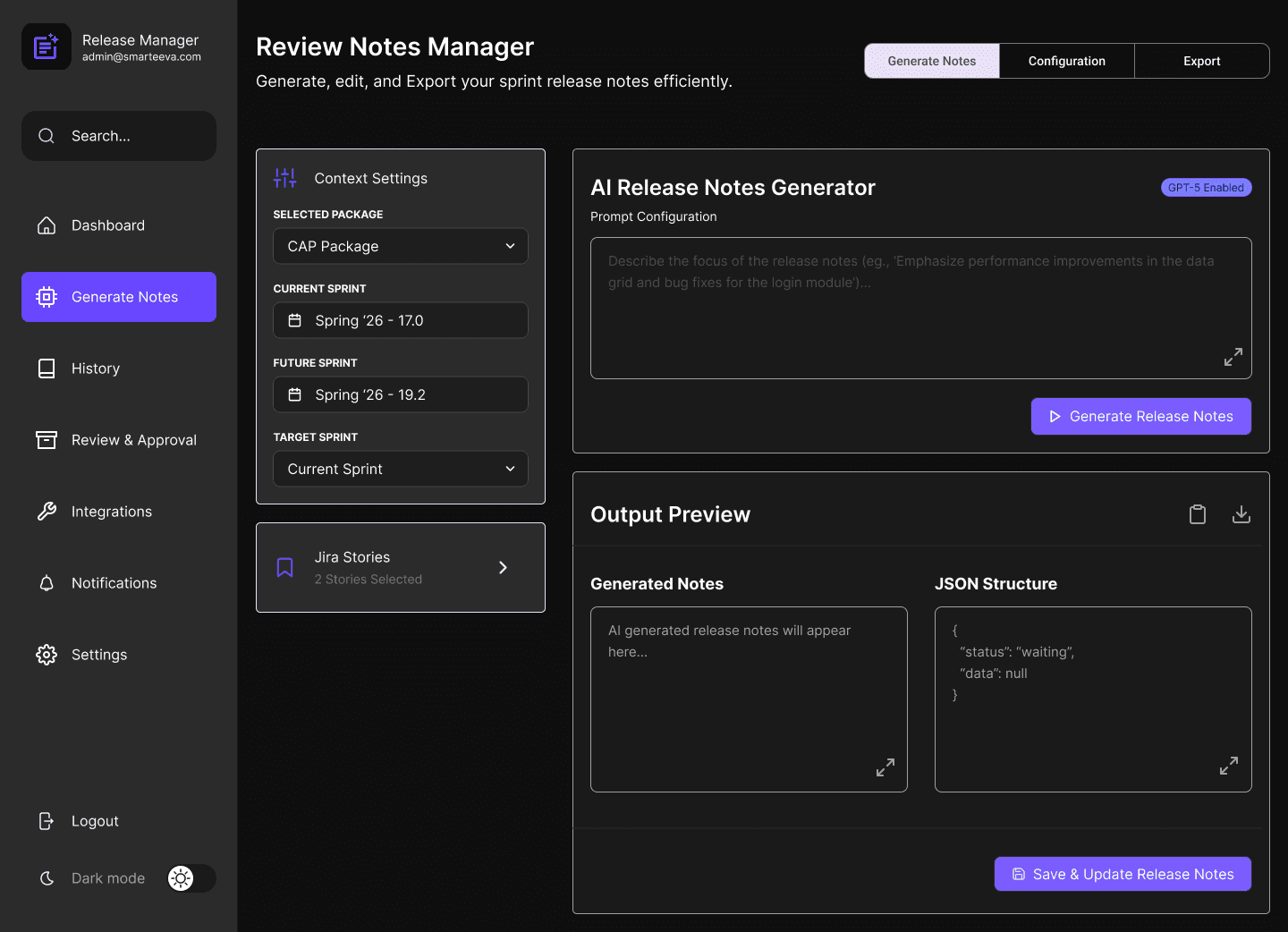
Package and sprint selection
Prompt configuration
Deterministic AI generation
JSON-backed output preview
Transforms raw Jira stories into structured content.
Screen 3 — Configuration & Export Selection
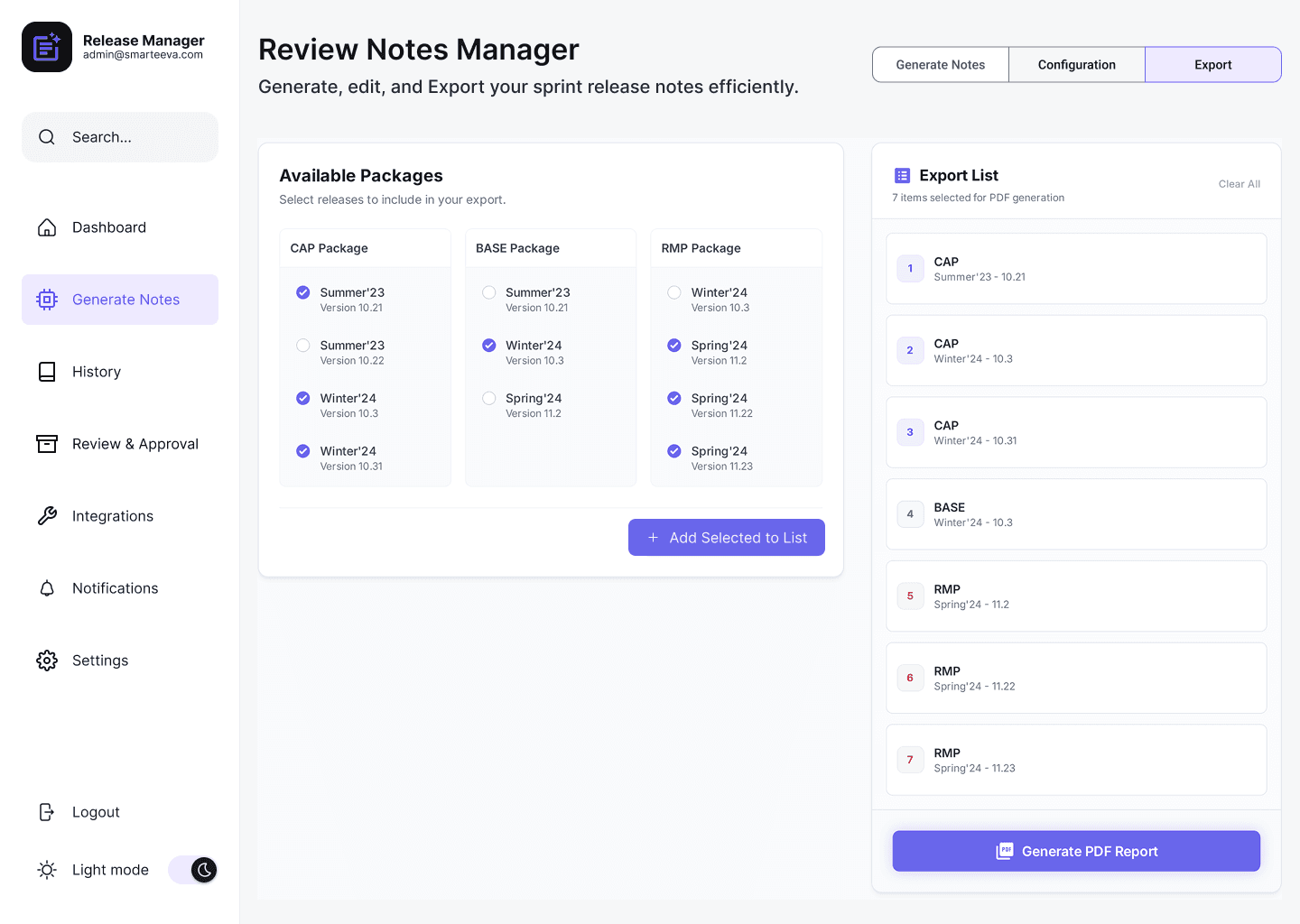
Multi-package and multi-version selection
Reordering releases before export
Export list management
Eliminates manual compilation across teams.
Screen 4 — Review & Approval Flow
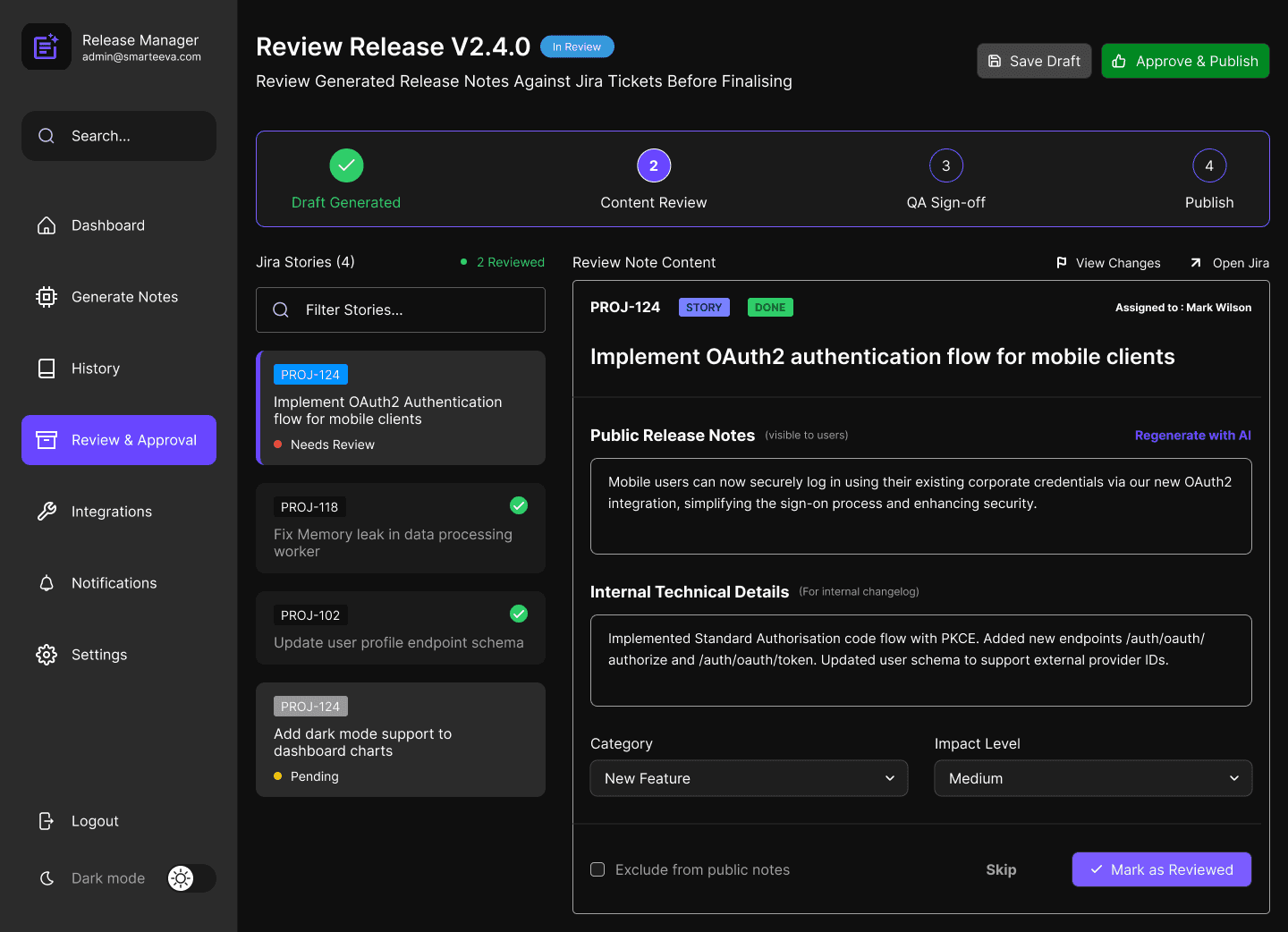
Public vs internal notes separation
Jira-linked review
AI regeneration per item
QA sign-off and final approval
Prevents hallucinations and ensures accountability.
Screen 5 — Jira Integration
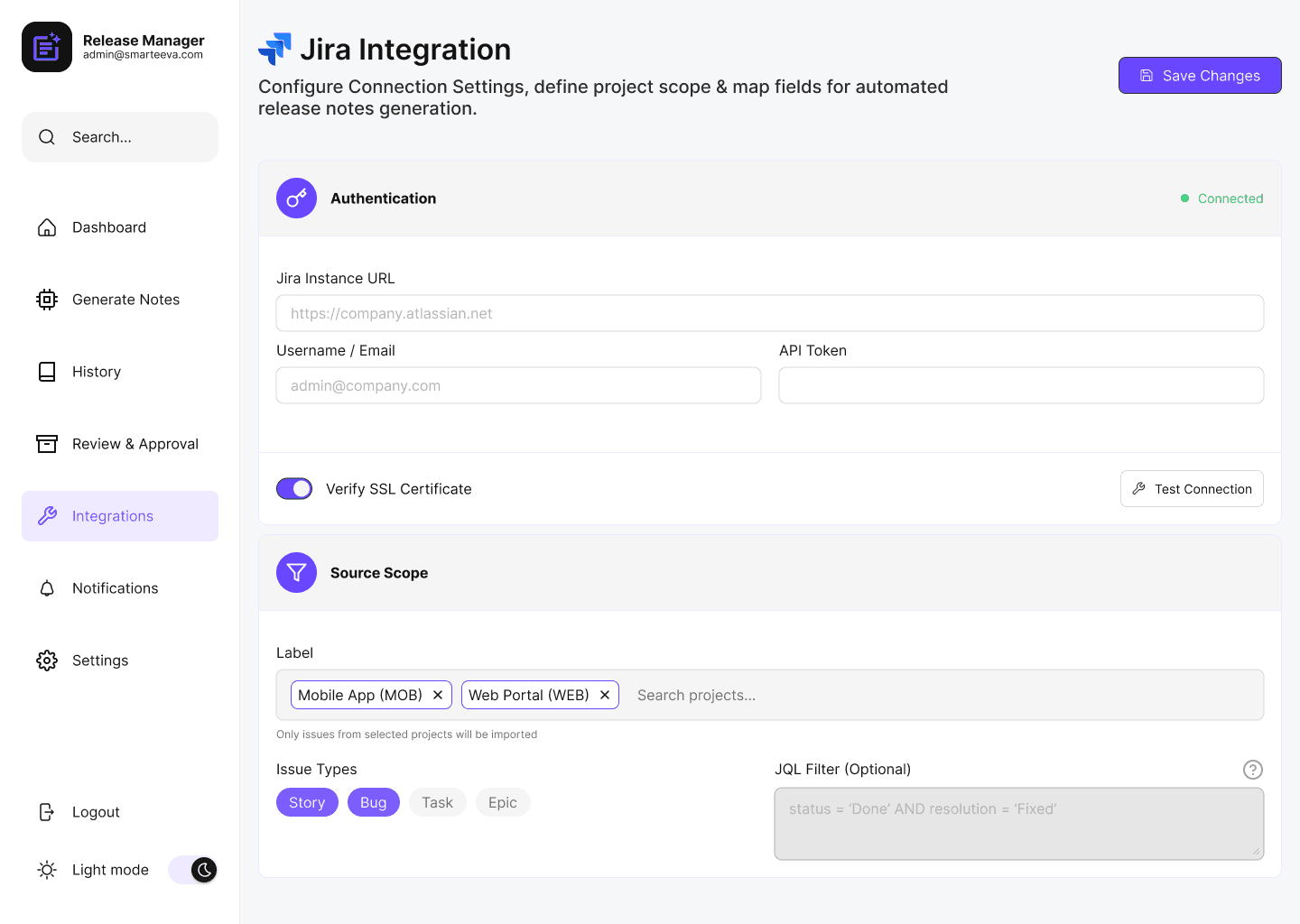
Authentication and scope control
Issue-type filtering
Label-based imports
Ensures clean, reliable inputs.
07 — Design System
1. Design Principles
Clarity over decoration
Predictability over creativity
Governance-first AI UX
2. Color System
Optimized for light and dark modes.
Primary
Purple family — actionable but restrained
Neutrals
900 → 700 → 500 → 400 → 100
Inspired by Material elevation hierarchy
Semantic Colors
Green — approved / completed
Yellow — draft / pending
Red — errors / blockers
Blue — informational states
3. Typography
Inter
High x-height
Excellent readability
Ideal for dense enterprise UI
4. Accessibility
WCAG AA contrast
48px touch targets
Minimal motion
Colorblind-safe palette
08 — Impact
Quantitative
Release creation time: 2–3 hours → 5–7 minutes
Consistency improved by ~90%
Manager rewrite time reduced significantly
Multi-package export: ~45 minutes → under 1 minute
Qualitative Feedback
“This finally removed the chaos from release notes.”
“We don’t rewrite Jira anymore.”
“Publishing feels controlled and reliable now.”
09 — Challenges & Learnings
Working independently required combining product strategy, UX thinking, AI behavior, and enterprise constraints into a cohesive system.
Challenges
Enforcing deterministic AI output
Supporting different package structures
Designing scalable review flows
Preventing over-automation
What I Learned
How to design AI-assisted documentation workflows
How to balance automation with human oversight
How to structure AI output for enterprise trust
How to replace engineering-heavy processes with scalable systems
10 — Flow Chart
The flow below illustrates how Release Notes Manager separates AI generation, publishing, and external distribution into a predictable, enterprise-safe workflow.
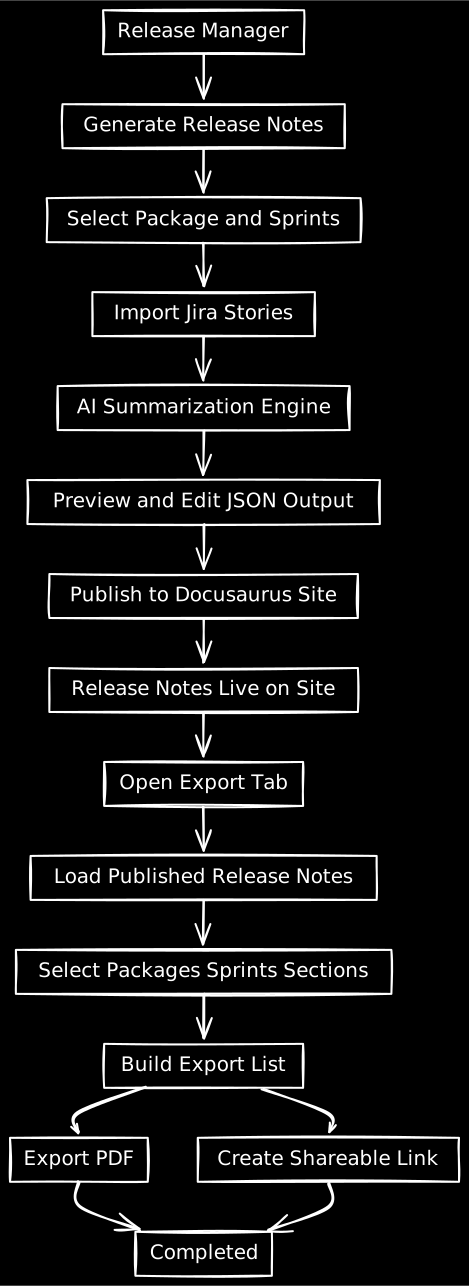
Key principles illustrated in this flow:
AI generation happens only once during the creation phase
All release notes are reviewed and published before they become shareable
The export flow is designed for non-technical users
External outputs never regenerate or modify content
Important:
The export process only consumes already published release notes.
It does not re-run AI generation, ensuring consistency, trust, and auditability.
11 — Final Reflection
This was a fully self-directed project — every UX decision, architectural insight, and design detail was created solely by me.
Release Notes Manager didn’t just automate documentation — it standardized, governed, and scaled it.
It strengthened my ability to design:
AI-assisted enterprise workflows
Complex internal tools
Governance-first AI UX
Scalable design systems