Decision Tree Builder
UX • UI • Product Design • Decision Trees
A complete transformation of Smarteeva’s legacy decision-tree tool into a modern, visual rule-building environment with instant preview, guardrails, and intuitive branching. The redesign reduced configuration errors, accelerated admin workflows, and became the core logic engine powering multiple regulatory modules.

Project Overview
Smarteeva’s decision-tree engine supports FDA-regulated workflows across global medical device manufacturers — including MDR triage, product assessments, and multi-step questionnaires.
The original system wasn’t just a “bad UI.”
It was built on a broken mental model:
Logic was scattered across hidden Salesforce tables
No visual representation of branching
Iteration was painfully slow due to page reloads
Admins could easily create invalid or looping flows
Engineering had to diagnose logic failures manually
I led the end-to-end redesign of this system — redefining the interaction model, rebuilding the workflow philosophy, and shipping a scalable, visual, error-resistant decision-tree builder.
My role
Reconceived the core logic model with product + engineering
Designed the node-based branching system from scratch
Built high-fidelity prototypes, flows, and animations
Delivered production-ready React/HTML/CSS for LWC
Created reusable patterns for all future logic-driven modules
This became one of the highest-leverage internal tools across every major implementation.
The Problem
❌ Before the Redesign
Logic editing split across 4–6 Salesforce pages
No visualization of branches or paths
Admins couldn’t validate flows before publishing
High chance of loops, dead ends, or invalid conditions
Large trees (20–50 questions) became unmanageable
Support teams spent hours debugging customer issues
Salesforce rendering slowed every interaction
❗ Core Pain Points
No mental model of how the tree behaved
Rules disconnected from the actual question flow
Complex regulatory logic couldn’t scale
Changing one rule risked breaking entire trees
Users / Audience
Implementation specialists
Regulatory & quality teams
Product administrators
QA testers
Solution architects
Salesforce engineering teams
These users needed clarity, speed, and safe guardrails — none existed in the legacy tool.
User Needs (Critical Insights)
A visual branching model instead of hidden tables
Inline rule editing without switching pages
Clear cause-and-effect between conditions and the next question
A real-time preview to validate logic paths
Support for large question sets
Guardrails to prevent invalid or looping logic
Goals
Shift mental model from tables → flow paths
Reduce setup & debugging time by 50%+
Remove dependence on engineering
Make branching transparent and visual
Support 50+ node logic trees without confusion
Prevent invalid states without restricting flexibility
UX / Architecture Overview
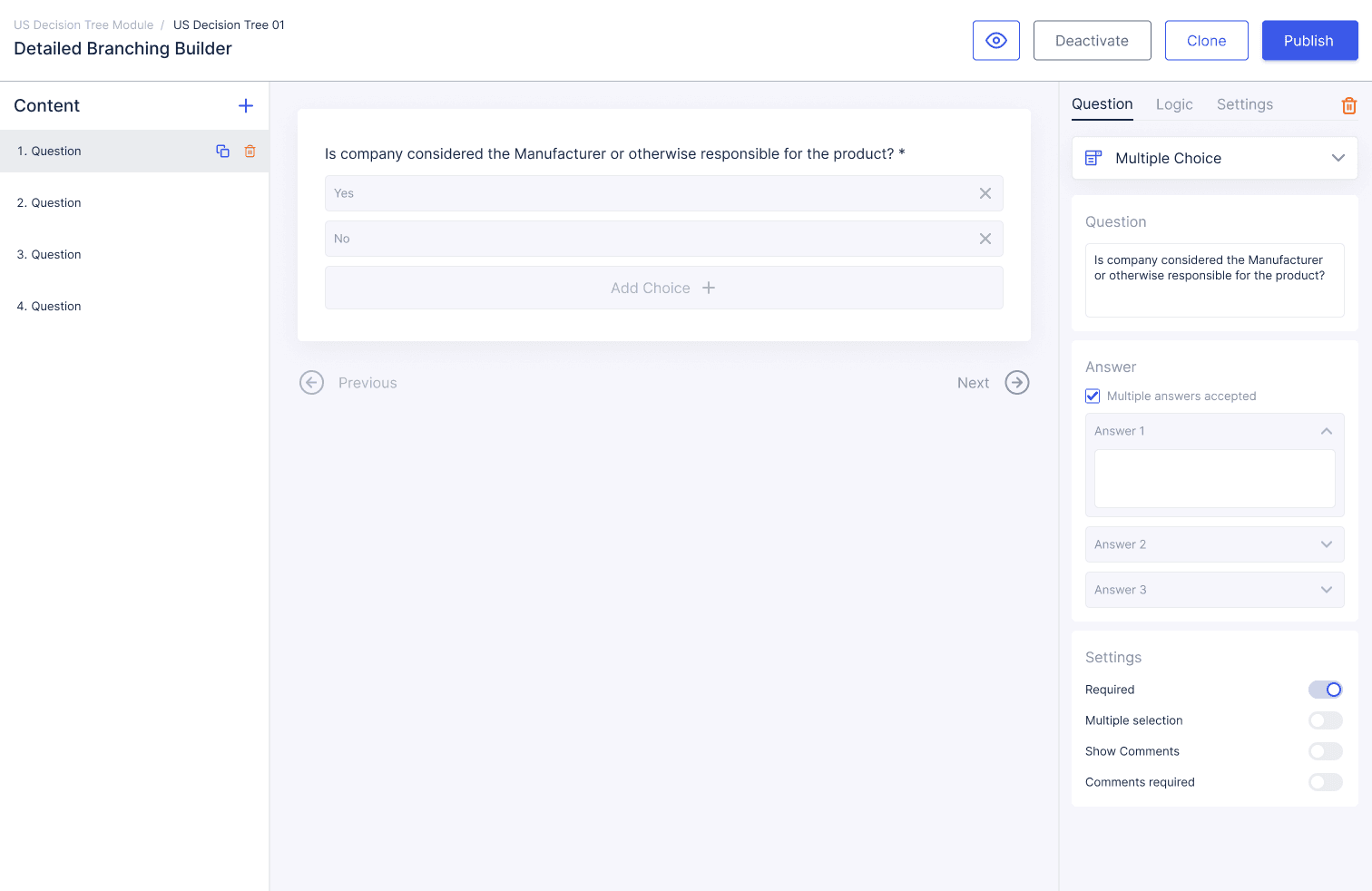
1. Question Editor
A clean, predictable interface to:
Create and edit questions
Configure answer types and validations
Manage multi-step layouts
Replaced Salesforce’s inconsistent forms with structured, linear workflows.
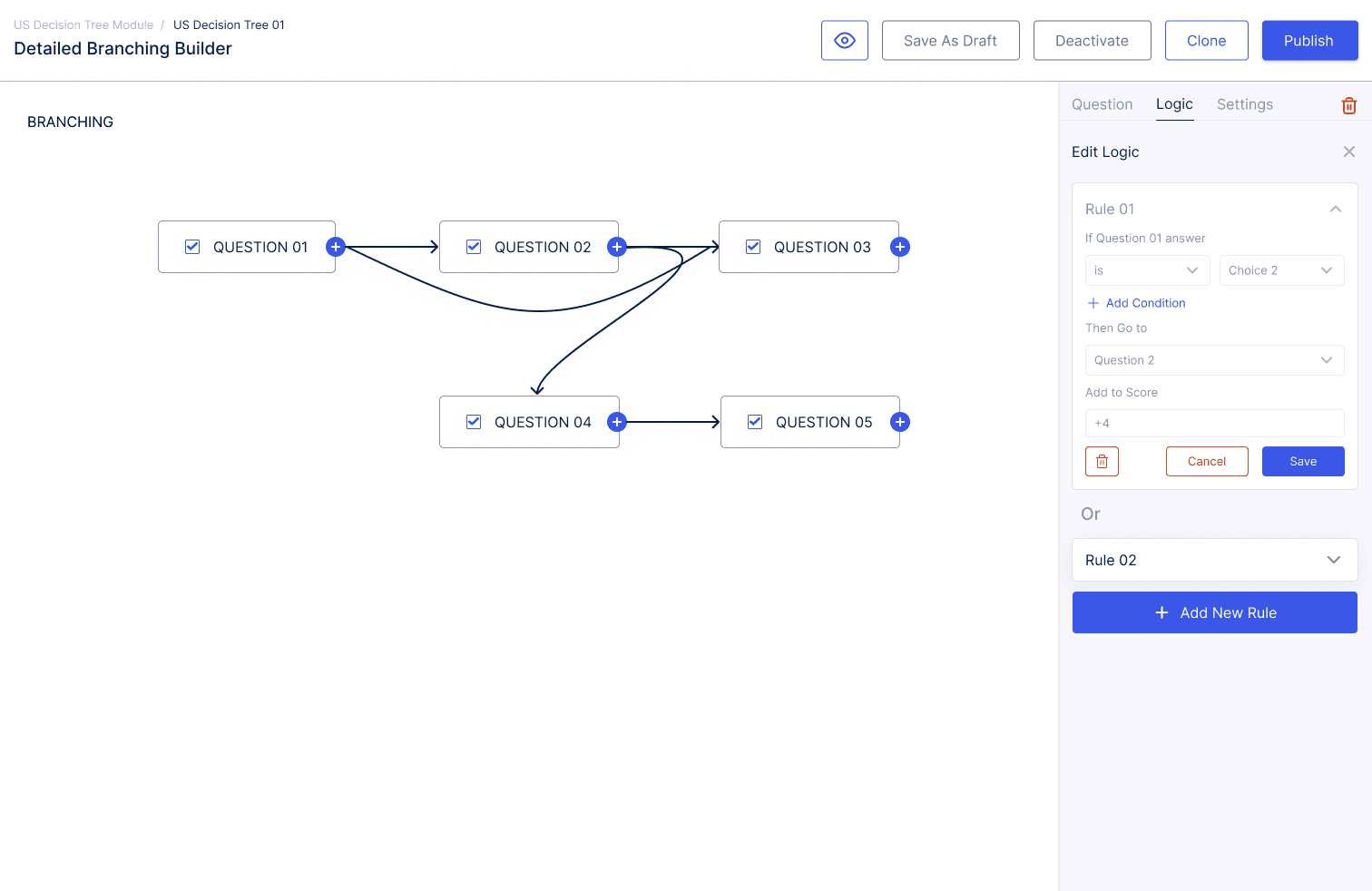
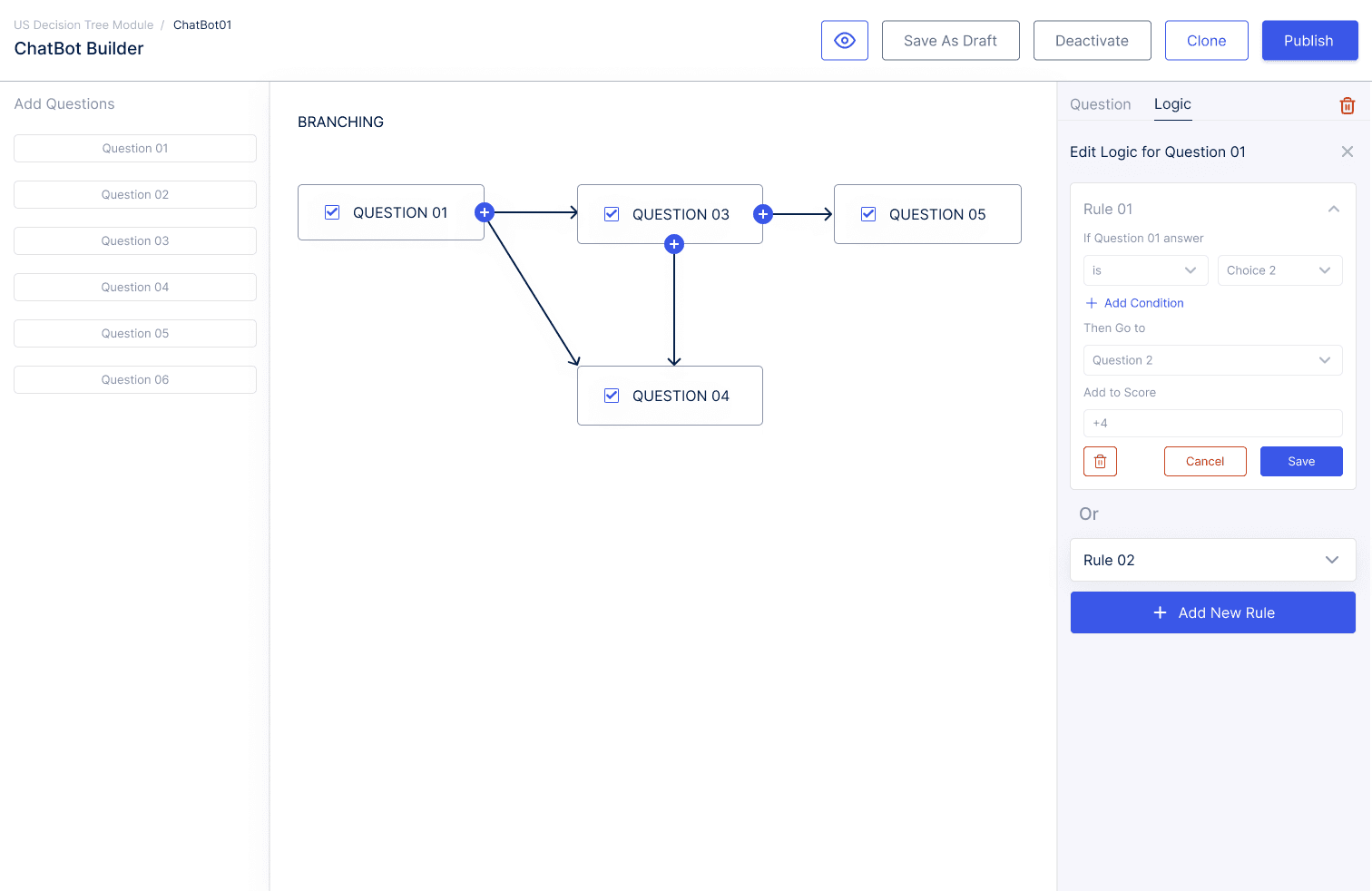
2. Visual Logic Builder (Core Experience)
A fully visual node-based engine featuring:
Drag-and-drop connectors
Multi-condition rule groups
Score adjustments
Conditional branching
Automatic loop prevention
Inline rule editing without reloads
Admins could finally see the logic instead of guessing it.
3. Tabbed Configuration Model
To reduce cognitive load, I introduced a clear mental structure:
Content — question list
Configure — layouts & form structure
Logic — branching behavior
Settings — validation, scoring, metadata
Each tab matched a distinct thought process.
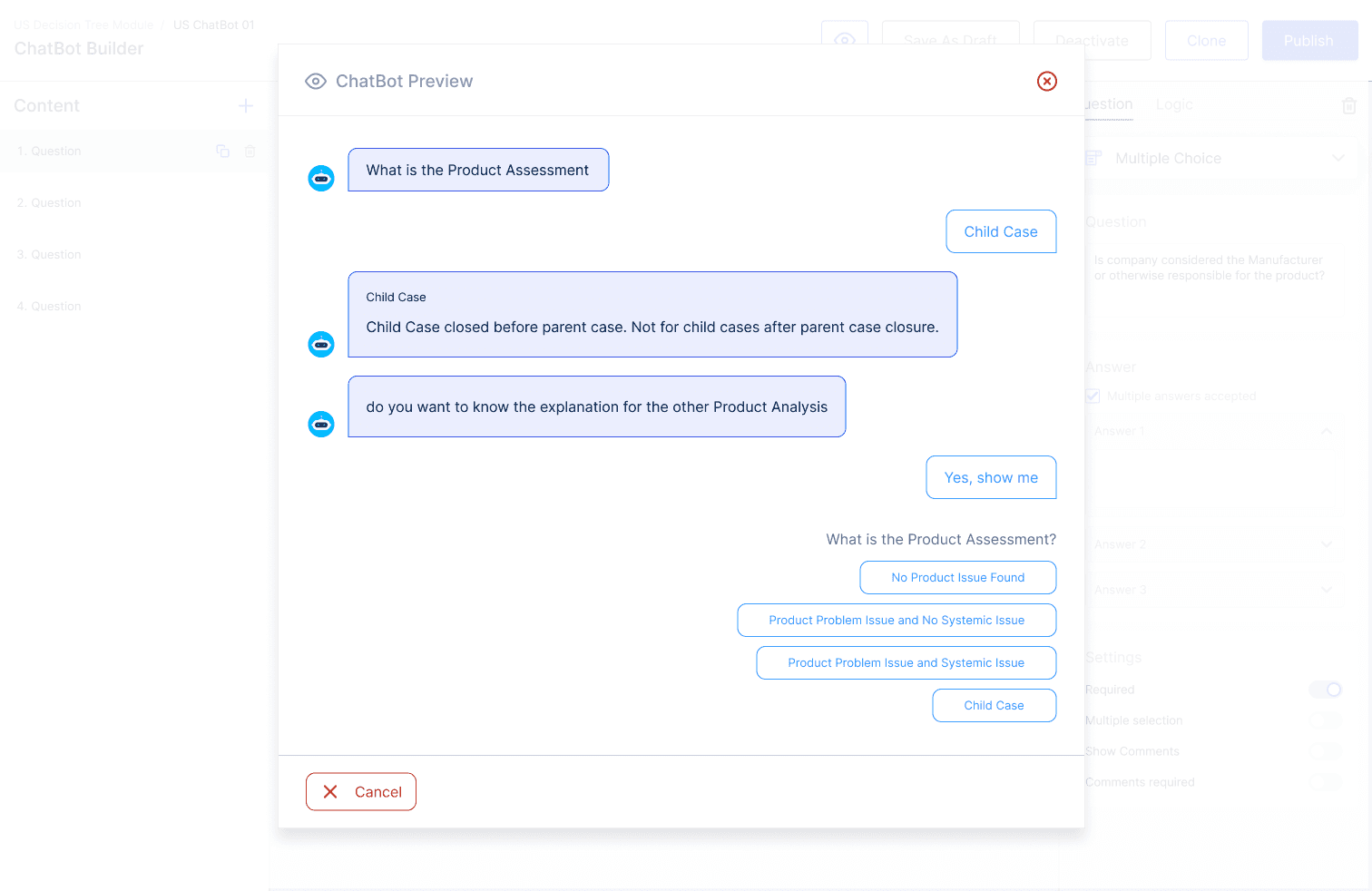
4. Real-Time Preview Mode
A step-by-step simulator that:
Shows questions exactly as users see them
Simulates jumps based on branching
Displays scores and rule effects in real time
Highlights missing or invalid logic
This became the most loved feature by implementation teams.
Process
1. Research & R&D
Interviewed implementation teams and regulatory SMEs
Analyzed logic failures in real customer deployments
Reverse-engineered legacy Salesforce behavior
Benchmarked enterprise logic-building tools
Identified root causes: mental model mismatch + no visualization
2. UX Flow Definition
Defined a predictable workflow:
Create Question → Configure Layout → Add Logic → Preview → Publish
This replaced a chaotic, page-hopping process.
3. High-Fidelity UI & Interaction Design
Delivered:
Full Figma design system
Clickable prototypes for usability testing
Production-ready components for Salesforce LWC
Motion patterns optimized for low-latency rendering
This significantly accelerated engineering adoption.
Impact
Quantitative
Rule creation time reduced 50–60%
Logic errors (loops, dead ends) dropped drastically
Support tickets related to logic trees decreased
Salesforce configuration cycles sped up
Qualitative
“Finally we can see the flow.”
“The preview changed everything.”
“Logic is understandable for the first time.”
Teams onboarded in hours, not days
Challenges
Designing a branching model that is both flexible and safe
Preventing loops without limiting creativity
Working within Salesforce LWC performance constraints
Keeping large trees readable (50+ nodes)
Creating guardrails that felt supportive, not restrictive
Reflection
This project strengthened my capability to design complex, enterprise-grade logic systems. I learned how to:
Redesign workflows by shifting mental models, not just UI
Build scalable interaction patterns for branching systems
Collaborate tightly with engineering on feasibility
Prototype logic-heavy workflows that must remain error-proof
Deliver designs that directly accelerate engineering output
The Decision Tree Builder became one of Smarteeva’s most influential and widely adopted internal tools.
Flowchart

Screens